
Key takeaways
- The best podcast summarizer depends on the job: Snipd and Podwise for listeners who want to read shows, NoteGPT or ScreenApp for a quick one-off (paste a Spotify/YouTube link), Castmagic / Podsqueeze / Deciphr for creators repurposing their own show, and ChatGPT or Claude if you want to do it yourself free.
- You can summarize any podcast free in about two minutes — paste a URL into a web tool, or paste the transcript into ChatGPT with the prompt below. The step-by-step is further down.
- The hard part isn't the summary, it's the details: speaker attribution, verbatim quotes, and clickable timestamps. Most tools get these wrong; this guide shows you what to demand.
- We have unusual standing to write this: Teahose runs an automated pipeline that has transcribed and summarized 490+ full podcast episodes — part of 1,150+ expert summaries (~1M+ words) across podcasts, newsletters and research — 1,160 in total, of which 494 are audio episodes, as of June 2026.
- Contrarian point most "best summarizer" lists miss: the winning move usually isn't running a tool at all. For the shows that matter, a curated, always-on summary already exists — you just have to read it.
Quick answer: A podcast summarizer is a tool that turns a podcast episode into a short, readable digest — key takeaways, notable quotes, and (in the good ones) clickable timestamps. The fastest free way to summarize one episode is to paste its YouTube or Spotify link into NoteGPT or ScreenApp; the best way to keep up with many shows is to read summaries someone already produces.
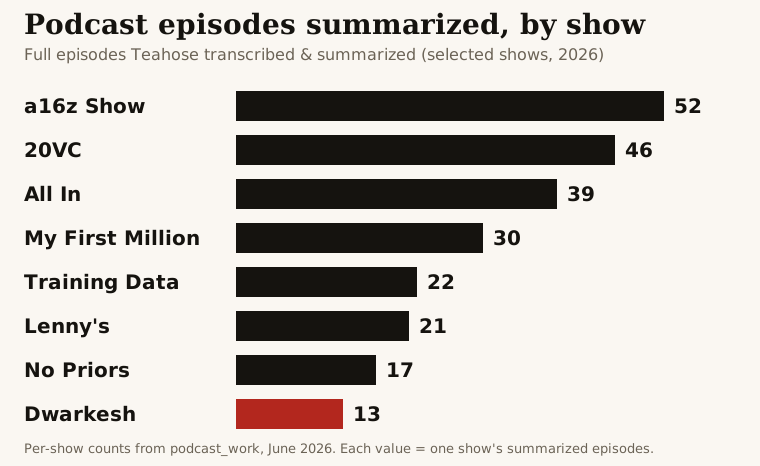
Each bar is the number of full episodes we've transcribed and summarized for that show, as of June 2026.
See it in action: browse the free archive of timestamped summaries — the chart above is a snapshot; the archive updates within hours of each new episode, and the live signal feed tracks the companies and people those episodes mention.
What is a podcast summarizer?
A podcast summarizer is software that listens to (or reads a transcript of) a podcast episode and produces a condensed version: the main arguments, key takeaways, notable quotes, the people and companies mentioned, and often a set of timestamps. The point is triage. A typical interview podcast runs 60–150 minutes; a good summary lets you decide in two minutes whether it's worth your hour, and tells you exactly where the worthwhile parts are.
There are three broad families, and picking the right family matters more than picking the right brand:
- Listener tools turn shows you follow into readable summaries, transcripts and highlights (Snipd, Podwise).
- One-off web tools take a single URL or file and hand back a summary (NoteGPT, ScreenApp, Mapify, Snipcast, Heuristica).
- Creator tools help podcasters repurpose their own episodes into show notes, clips and social posts (Castmagic, Podsqueeze, Deciphr, Swell AI, Podium).
Then there's the do-it-yourself route (ChatGPT, Claude) and the read-an-existing-summary route (Teahose). We'll cover all of them.
The best podcast summarizers in 2026
Here's the honest landscape, grouped by who you are. Pricing changes constantly, so we focus on what each tool is for rather than this month's exact number.
Best for listeners (read shows instead of hearing them)
Snipd — the best mobile experience for podcast listeners. It's a full podcast player where you "snip" a moment (a triple-tap of your headphones) and it saves the audio clip, transcript and an AI summary of that segment. Whole-episode AI summaries and chapter breakdowns too. Best if you already listen on the go and want to capture and revisit highlights.
Podwise — the best structured output. Every episode becomes a summary, full transcript, outline, key-takeaways list and even a mind map, all browsable later. It also exposes episodes to terminal, agent and MCP workflows, which makes it the power-user pick for people who want to query episodes programmatically. Subscription with a free trial.
Best for a one-off summary (single episode, fast)
NoteGPT — paste a podcast or YouTube URL (or upload a file) and get a summary you can export to Notion or Obsidian. Broad, general-purpose, large free-tier user base. Good default if you just need one episode digested now.
ScreenApp — paste a Spotify episode URL and get a summary with timestamps, key takeaways and speaker identification in under a minute. The speaker labels and timestamps make it more useful than most one-off tools for interview shows.
Mapify — turns an episode into a visual mind map rather than prose. Genuinely useful if you think spatially or want to see how topics connect; less useful if you just want a paragraph and bullets.
Snipcast — email-first. Subscribe and it delivers AI summaries of episodes straight to your inbox. A lightweight way to follow a few shows without opening an app.
Heuristica — a free AI podcast summarizer aimed at study-style note-taking; fine for occasional use.
Best for creators (repurpose your own show)
Castmagic — the broadest repurposing suite: show notes, timestamps, social posts, newsletters, quotes and clips from a single upload. Built for podcasters who want to turn one recording into a week of content.
Podsqueeze — show notes, episode titles, timestamps, transcripts, social posts and a blog draft, with a clean free trial. A popular, affordable creator default.
Deciphr — transcripts, summaries, chapters and audiograms (those captioned audio-clip videos for social). Strong on the visual/clip side.
Swell AI and Podium — both target the production workflow: Swell AI for an end-to-end content pipeline, Podium for fast show-note generation. Solid, narrower tools.
Best free / DIY (ChatGPT and Claude)
You don't strictly need a paid tool. ChatGPT (including the community "Podcast Summarizer" GPT) and Claude will both summarize an episode well — if you give them the transcript. They can't reliably listen to audio inside a chat, and they can't produce true clickable timestamps, but for a quick text digest they're free and flexible. The exact prompt is in the next section.
Best for keeping up with many shows (curated, done-for-you)
Teahose — a different model entirely. Instead of handing you a tool to run, Teahose runs the pipeline for you and publishes free summaries of every episode of the major AI, tech and business podcasts, usually within hours of release. Each summary carries key takeaways, the companies and people mentioned, and clickable timestamps that jump to the exact moment in the video. If your goal isn't "summarize this one episode" but "keep up with the field without listening for 20 hours a week," reading is faster than running a tool. See the shows we cover, and how deep, in the free archive — or compare the curated picks in our best AI podcasts guide.
At a glance
| Tool | Best for | Free option | Standout feature |
|---|---|---|---|
| ★ Teahose | Keeping up with many shows | Yes | Curated daily summaries of the major shows, real clickable timestamps, entity tracking |
| Snipd | Listeners (mobile) | Yes | Tap-to-snip highlights with audio + summary |
| Podwise | Listeners (power users) | Trial | Summaries, transcripts, outlines, mind maps, MCP access |
| NoteGPT | One-off, general | Yes | Paste URL, export to Notion/Obsidian |
| ScreenApp | One-off, interviews | Yes | Timestamps + speaker ID in under a minute |
| Mapify | Visual thinkers | Limited | Mind-map output |
| Snipcast | Inbox followers | Trial | Summaries emailed to you |
| Castmagic | Creators | Trial | Full repurposing suite (notes, clips, social) |
| Podsqueeze | Creators (budget) | Trial | Show notes + social + blog draft |
| Deciphr | Creators (video) | Trial | Audiograms + chapters |
| ChatGPT / Claude | DIY, free | Yes | Flexible prompting; needs the transcript |
★ Teahose is our own curated summary service — listed first because it's what we make; the rest are independent tools we rate honestly.
How to summarize a podcast (free, step by step)
You can summarize any episode yourself in a couple of minutes. Two routes.
Route A — paste a link (fastest).
- Copy the episode's share URL from Spotify, Apple Podcasts or YouTube.
- Paste it into a URL-aware summarizer (NoteGPT, ScreenApp or Snipcast).
- Read the summary. ScreenApp will include timestamps and speaker labels; most others give takeaways and a short recap.
Route B — use ChatGPT or Claude with the transcript (most control).
- Get the transcript. On YouTube, open the … more → Show transcript panel and copy it. Many shows also publish their own transcript.
- Paste it into ChatGPT or Claude with a prompt like:
Summarize this podcast transcript. Give me: (1) a 3-sentence overview, (2) 5–8 key takeaways as bullets, (3) the most important verbatim quotes with the speaker's name — copy quotes word-for-word, do not paraphrase, (4) every company and person mentioned, and (5) approximate timestamps for each takeaway if the transcript includes them. If you're unsure who said something, say so rather than guessing.
- Verify before you cite. The model will sometimes attribute a quote to the wrong speaker or smooth a quote into something that was never said. Click back to the transcript for anything you plan to share.
Route C — don't summarize it at all. For the major AI, tech and business shows, a careful summary already exists. Reading one is faster than running any tool, and it's already been checked for the failure modes below. That's the Teahose archive.
How AI podcast summarizers actually work
Every tool above runs roughly the same four-stage pipeline under the hood. Understanding it tells you where each one breaks.
- Transcription. The audio is converted to text by a speech-to-text model. Accuracy is high for clear speech but drops on crosstalk, accents and technical jargon — the first place errors enter.
- Speaker diarization. The transcript is split by who's talking. This is genuinely hard: many systems collapse two voices into one, or label a guest's words as the host's. Misattribution here is the single most common reason a summary credits a quote to the wrong person.
- Summarization. A large language model reads the transcript and produces the digest. This is where quotes get paraphrased (so they read clean but aren't verbatim) and where company or product names that were garbled in step 1 get baked in as fact.
- Enrichment. The better tools add timestamps, extract the entities mentioned (companies, people), and tag topics so episodes become searchable and trackable.
The takeaway: the summary paragraph is the easy part — every tool does it acceptably. The details (right speaker, exact quote, correct names, real timestamps) are where tools diverge, and they're exactly the details you need if you're going to act on or cite the content.
What separates a good podcast summary from a useless one
After producing thousands of these, the difference comes down to four things:
- Quotes attributed by content, not by label. When diarization is unreliable, the only safe way to credit a quote is to reason about who would actually have said it from the substance — not to trust a possibly-wrong speaker tag.
- Verbatim quotes. A paraphrased "quote" is worse than no quote, because it looks citable but isn't. Good summaries copy quotes character-for-character.
- Repaired names. A garbled company or product name doesn't just read badly — it corrupts any search, tracking or analysis built on top of the summary. The good pipelines fix names even inside quotes.
- Clickable timestamps. A takeaway you can't verify is a claim you have to trust. A takeaway that links to the exact second in the video is a claim you can check in five seconds. This is the feature that turns a summary from a recap into a research tool — and it's the one DIY ChatGPT can't give you.
These are precisely the standards the Teahose pipeline is built around, which is why we can publish summaries of episodes you'd otherwise have to vet yourself.
Podcast summarizer for creators vs. listeners
The word "podcast summarizer" hides two very different jobs:
- If you make podcasts, you want repurposing: turn one recording into show notes, titles, chapters, social clips and a newsletter. That's Castmagic, Podsqueeze, Deciphr, Swell AI and Podium. Optimize for breadth of output formats and how little editing the output needs.
- If you consume podcasts, you want triage and recall: read shows instead of hearing them, and find the parts worth your time. That's Snipd, Podwise, the one-off web tools — and, for the major shows, Teahose. Optimize for accuracy, timestamps, and whether the summaries you need already exist so you don't have to generate them.
Most "best podcast summarizer" articles blur these two audiences together and end up useless for both. Decide which job you're doing first.
A faster model: curated summaries you just read
Here's the contrarian conclusion. For any specific, obscure episode, you'll need one of the tools above. But the reason most people search for a podcast summarizer is that they're drowning — too many great AI and tech shows, not enough hours. For that problem, running a tool episode-by-episode is the slow path.
The fast path is to read summaries someone already produces to a high standard. Teahose transcribes and summarizes every episode of the major shows — Dwarkesh, No Priors, BG2, All In, Training Data, 20VC and dozens more — with the speaker-attribution, verbatim-quote and timestamp standards above, then extracts the companies and people each episode mentions into a searchable signal feed. It's free to read, and new episodes appear within hours.
Try it the lazy way: skim the free summary archive, then let the best of each day come to you — the daily digest emails a short, hand-picked set of new summaries so you never have to run a summarizer again.
What the Podcasts We Summarize Are Talking About Now
Ranked by 7-day signal volume extracted from the shows we summarize (plus newsletters & papers) by the Teahose pipeline
- 01OpenAI70 signals · 7d
- 02Anthropic64 signals · 7d
- 03Meta34 signals · 7d
- 04Nvidia33 signals · 7d
- 05Bending Spoons21 signals · 7d
- 06Google20 signals · 7d
- 07Eclipse20 signals · 7d
- 08Databricks16 signals · 7d
- 09Instinct15 signals · 7d
- 10Paid in Full Foundation15 signals · 7d
Related guides
Best AI podcasts (2026), ranked · How to get podcast notes (+ free template) · All-In Podcast: the besties & best episodes · Best AI newsletters · The full free summary archive · Live signal feed.
Tool landscape and pricing as of June 23, 2026; tools re-price and re-launch constantly, so re-check before committing. Teahose's summary archive and signal feed update continuously.
Bottom line: For a single obscure episode, paste its link into NoteGPT or ScreenApp, or run the ChatGPT prompt above — just verify the quotes and timestamps before you trust them. For keeping up with the field, stop running tools episode-by-episode and read summaries that already exist: that's the Teahose archive, free and updated within hours of each release.
Frequently Asked Questions
What is the best podcast summarizer?
It depends on who you are. For listeners who want to read instead of listen, Snipd and Podwise are the best dedicated apps. For a one-off summary of a single episode, a web tool like NoteGPT or ScreenApp (paste a Spotify or YouTube link, get a summary in under a minute) is fastest. For creators repurposing their own show, Castmagic, Podsqueeze and Deciphr lead. If you want the major AI, tech and business shows summarized for you every day — with clickable timestamps — that is what Teahose does, free.
Is there a free podcast summarizer?
Yes. Most tools have a free tier or trial: NoteGPT, ScreenApp, Snipd, Mapify and Heuristica all let you summarize at least a few episodes free. You can also do it yourself for free by pasting a transcript into ChatGPT or Claude. And Teahose publishes free timestamped summaries of every episode of the major AI and tech podcasts — no tool to run, nothing to paste.
How do I summarize a podcast?
Three ways. (1) Paste the episode’s Spotify or YouTube URL into a web summarizer like NoteGPT or ScreenApp. (2) Get the transcript (YouTube auto-captions, or the show’s own transcript) and paste it into ChatGPT or Claude with a prompt asking for key takeaways, quotes and timestamps. (3) Skip the work entirely and read an existing summary — Teahose already summarizes the major shows. The full step-by-step, including a copy-paste ChatGPT prompt, is in this guide.
Can ChatGPT summarize a podcast?
Yes, if you give it the transcript. ChatGPT can’t listen to audio directly in a chat, so first get the transcript (YouTube captions or the show transcript), then paste it in with a prompt. There’s also a community "Podcast Summarizer" GPT. The catch: long episodes exceed the context window, ChatGPT will paraphrase quotes (so they’re not verbatim), and it can’t produce real clickable timestamps. Use the prompt in this guide and verify any quote against the transcript before citing it.
How do I summarize a Spotify podcast?
Copy the episode’s share link from Spotify and paste it into a web summarizer that accepts URLs — ScreenApp, NoteGPT and Snipcast all do. They fetch the audio, transcribe it, and return a summary with key points (ScreenApp adds speaker labels and timestamps). For shows we already cover, the summary is on Teahose before you’d finish pasting.
How do I summarize a YouTube podcast?
YouTube is the easiest source because the captions are already there. Paste the video URL into a YouTube-aware summarizer (NoteGPT, ScreenApp, Mapify), or open the transcript panel on YouTube, copy it, and paste it into ChatGPT or Claude. Teahose summaries of the major shows also link straight to the YouTube timestamp for each key moment, so you can jump to the exact second a point was made.
What is the best AI podcast summarizer?
For pure listening-replacement, Snipd has the best mobile experience and Podwise the best structured output (summaries, transcripts, outlines, mind maps). For accuracy on long, multi-speaker episodes, the limiting factor across every tool is speaker attribution and quote fidelity — the things generic summarizers get wrong most often. Teahose is built specifically to fix those: real speaker names, verbatim quotes snapped to the exact timestamp, and entity extraction so you can track which companies and people came up.
Can I get a podcast summary with timestamps?
Yes, and you should insist on it — timestamps are what make a summary actionable instead of just a recap. ScreenApp and several creator tools add them; ChatGPT cannot generate reliable ones from a raw transcript. Every Teahose summary carries clickable timestamps that jump to the exact moment in the YouTube video, so you can verify any claim or listen to just the part that matters.
How accurate are AI podcast summaries?
The overall gist is usually reliable; the details are where tools fail. The three common failure modes are misattributed quotes (the wrong speaker credited), paraphrased "quotes" that were never said verbatim, and garbled company or product names that poison any downstream analysis. Good summaries attribute by content, keep quotes word-for-word, and repair names. Always treat an AI summary as a triage layer and click through to the timestamp before quoting anything publicly.
Does Teahose summarize podcasts for free?
Yes. Teahose publishes free summaries of every episode of the major AI, tech and business podcasts — each with key takeaways, the companies and people mentioned, and clickable timestamps — usually within hours of release. To date we’ve summarized 490+ full podcast episodes, part of 1,150+ expert summaries across podcasts, newsletters and research. You can read the archive at /podcasts or get the best of each day in the free daily digest.
Should I use a podcast summarizer instead of listening?
Use it to triage, not to replace. A two-minute summary tells you whether an hour-long episode earns a full listen. The pattern heavy consumers converge on: keep one or two shows as full listens, read summaries for everything else, and jump to the timestamps that matter. That way you cover ten times the ground without losing the depth on the episodes that count.