
Key takeaways
- Podcast notes = a written digest of an episode: takeaways, quotes, mentioned people/companies, and timestamps. "Show notes" are what a creator publishes; "listener notes" are what you (or an AI) capture to read instead of listen.
- Three ways to get them: do it yourself with a transcript + ChatGPT, paste a URL into a notes app (Snipd, NoteGPT, Podwise), or read notes someone already wrote. The fastest route for the major shows is the third.
- Writing your own? There’s a free copy-paste show-notes template below — hook, summary, takeaways, timestamps, quotes, mentions, CTA.
- We have standing to write this: Teahose runs a pipeline that has published notes for 71 shows across 1,150+ expert summaries (~1M+ words) — 1,160 and counting, as of June 2026.
- The contrarian point most "podcast notes" pages miss: for the shows that matter, careful notes already exist — reading them beats running any tool episode-by-episode.
Reader or creator? Two different jobs hide under "podcast notes." Readers want notes for an episode they'd rather read than hear — start with the three routes below. Creators want to write their own show notes — skip to the template, tools and platform tips. This guide is the rare one that does both; almost every other result covers only the creator half.
Quick answer: To get notes for any podcast, paste the episode’s YouTube or Spotify link into a notes app like NoteGPT or Snipd, or paste the transcript into ChatGPT with a takeaways-and-quotes prompt. To keep up with many shows, read notes someone already produces — that’s what Teahose does, free, with clickable timestamps.
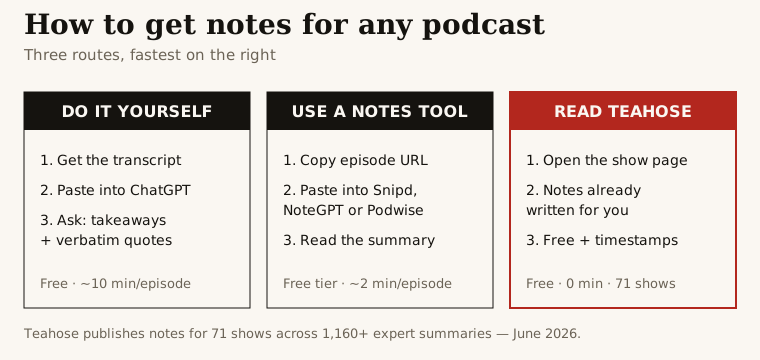
The framework above is the whole guide in one picture. Teahose publishes notes for 71 shows — browse the free archive.
What are podcast notes (and show notes)?
Podcast notes are a written version of an episode you can scan in two minutes instead of hearing in two hours. The good ones carry five things: a short summary, the key takeaways, notable verbatim quotes, the people and companies mentioned, and timestamps that jump to the exact moment each point was made.
The phrase covers two related but distinct jobs:
- Show notes — what a creator publishes alongside their own episode: a summary, the guest’s bio, links to everything mentioned, and a call to action. They live in the episode description and on the show’s site.
- Listener notes — what a reader wants: a faithful capture of what the episode actually said, so they can read it, search it later, or decide whether to listen. This is what PodcastNotes built an audience on, and what Teahose produces automatically.
This guide covers both: how to get listener notes for any episode, and how to write show notes for your own.
How to get podcast notes for any episode
You don’t need a paid tool. Three routes, fastest last.
Route A — paste a link (fastest one-off).
- Copy the episode’s share URL from Spotify, Apple Podcasts or YouTube.
- Paste it into a URL-aware notes app — NoteGPT, ScreenApp or Snipd.
- Read the notes. ScreenApp adds timestamps and speaker labels; most give takeaways and a recap.
Route B — ChatGPT or Claude with the transcript (most control).
- Get the transcript. On YouTube: … more → Show transcript, then copy. Many shows publish their own.
- Paste it in with a prompt like the one below.
- Verify before you cite — models misattribute quotes and smooth them into things never said. Click back to the transcript for anything you’ll share.
Route C — don’t take notes at all. For the major AI, tech and business shows, careful notes already exist. Reading them is faster than running any tool, and they’ve already been checked for the failure modes below. That’s the Teahose archive.
How to write podcast show notes (free template)
If you publish a podcast, here’s the structure that covers every job show notes do. Paste your transcript above it and an AI tool will fill it in; then edit for accuracy.
# [Episode title]
[1–2 sentence hook: the single most interesting thing in this episode.]

## Summary
[3 sentences: who the guest is, what the episode is about, why it matters.]

## Key takeaways
- [Takeaway 1]
- [Takeaway 2]
- [5–8 total]

## Timestamps
[00:00] Intro
[MM:SS] [Topic]
...

## Notable quotes
"[Verbatim quote — copied word-for-word, never paraphrased]" — [Speaker]

## Mentioned
People: [names]  ·  Companies: [names]  ·  Books/links: [list]

## [Call to action — subscribe, follow, related episode]
The two rules that make notes useful instead of decorative: copy quotes verbatim (a paraphrased quote looks citable but isn’t), and attach real timestamps (a takeaway you can’t verify is a claim you have to trust).
Where to publish show notes — and the per-platform gotchas
Show notes render differently depending on where they live, and the formatting rules differ too:
- Apple Podcasts — the episode description field. Largely plain text, and only the first line or two preview in most apps, so front-load the hook.
- Spotify — supports basic formatting and clickable links; timestamps can surface as chapters in some players.
- YouTube — the video description. Links are clickable, and timestamps written as
0:00 Topicauto-generate chapters — the richest surface for notes. - Your own site — no limits. This is where the full, internally-linked, SEO version belongs; it's also the version Google actually indexes, so it does the ranking work the platform fields can't.
How long should show notes be? A rule of thumb: 50–200 words for a short scannable version, up to ~800–1,000 for a full SEO version, with the summary itself around 100–200 words. Structure beats length — a skimmable set of takeaways and timestamps outperforms a wall of text at any word count.
Best podcast notes apps in 2026
Pick by who you are; the family matters more than the brand.
At a glance
| Tool | Best for | Free option | Standout |
|---|---|---|---|
| Snipd | Listeners (mobile) | Yes | Tap-to-snip a moment → audio + note |
| Podwise | Listeners (structured) | Trial | Summaries, transcripts, outlines, mind maps |
| NoteGPT | One-off notes | Yes | Paste URL, export to Notion/Obsidian |
| ScreenApp | Interview notes | Yes | Timestamps + speaker labels |
| Castmagic | Creators (show notes) | Trial | Full notes + clips + social from one upload |
| Podsqueeze | Creators (budget) | Trial | Show notes, titles, timestamps |
| ChatGPT / Claude | DIY, free | Yes | Flexible; needs the transcript |
| Teahose | Reading many shows | Yes | Notes already written, real timestamps, free |
For a deeper tool-by-tool comparison see the podcast summarizer guide; for which shows are worth notes in the first place, the best AI podcasts ranking.
What makes podcast notes actually good
After producing thousands of these, the difference comes down to four things — and they’re exactly where generic tools fail:
- Quotes attributed by content, not by a possibly-wrong speaker label.
- Verbatim quotes — word-for-word, or don’t call it a quote.
- Repaired names — a garbled company name corrupts any search or tracking built on the notes.
- Clickable timestamps — the feature that turns notes from a recap into a research tool, and the one DIY ChatGPT can’t produce.
These are the standards the Teahose pipeline is built around, which is why we can publish notes for episodes you’d otherwise have to vet yourself.
Where AI note-takers go wrong (and how to catch it)
Those four standards aren't abstract — they're the exact places we watch AI note-taking break, episode after episode, in our own pipeline. Every "just use AI" article skips this part. If you're generating notes yourself, these are the errors to hunt for before you publish or cite anything:
- Collapsed speakers → misattributed quotes. Automatic speaker diarization frequently merges two voices into one, so a guest's line gets credited to the host (or vice versa). The fix is to attribute by content — who would actually have said this? — not by the tool's speaker label. Catch it: if a "quote" sounds out of character for the named speaker, it probably is.
- Paraphrase-creep. Ask a model for "quotes" and it often hands back a cleaner sentence the person never actually said. It reads great and is uncitable. Catch it: paste the quoted sentence back into the transcript; if it isn't there word-for-word, it's not a quote.
- Garbled proper nouns. Transcription mangles company and product names (a fund's name turns into a common word — e.g. "Coatue" heard as "GoTo"), and the summary bakes the error in, which then corrupts any search or tracking built on the notes. Catch it: sanity-check every company and person name against what the episode is actually about.
- Hallucinated or missing timestamps. A raw transcript pasted into ChatGPT yields approximate timestamps at best and invented ones at worst — and never a clickable link. Catch it: a timestamp you can't click to verify is a claim you're trusting on faith.
We see all four often enough that the entire Teahose pipeline is built to defend against them — content-based attribution, verbatim-only quotes, name repair, and real YouTube-linked timestamps. It's the concrete reason a careful existing summary usually beats notes you generate in a hurry.
A faster model: notes you just read
Here’s the contrarian conclusion. For one specific, obscure episode, use a tool above. But most people searching for podcast notes are drowning — too many great shows, not enough hours. For that, running a tool episode-by-episode is the slow path.
The fast path is to read notes someone already produces to a high standard. Teahose writes notes for every episode of the major shows — All In, Dwarkesh, No Priors, BG2, 20VC, My First Million and dozens more — with the attribution, verbatim-quote and timestamp standards above, then extracts the companies and people each episode mentions into a searchable signal feed.
Is your show already covered? A sample of the archive right now — each number is the count of episodes we've published notes for (as of June 2026):
| Show | Notes published |
|---|---|
| a16z Podcast | 52 |
| 20VC | 46 |
| All-In | 39 |
| My First Million | 30 |
| Training Data | 22 |
| Lenny's Podcast | 21 |
| Invest Like the Best | 19 |
| No Priors | 17 |
| Dwarkesh | 13 |
| Cheeky Pint | 11 |
That's 10 of the 71 shows we cover, part of 1,160 notes and counting. No tool-roundup competitor can publish a table like this, because none has a corpus. Browse the full archive →
Read it the lazy way: skim the free notes archive, then let the best of each day come to you — the daily digest emails a short, hand-picked set of new notes so you never have to take them yourself.
What the Shows We Take Notes On Are Talking About Now
Ranked by 7-day signal volume extracted from the podcasts we summarize (plus newsletters & papers) by the Teahose pipeline
- 01OpenAI70 signals · 7d
- 02Anthropic64 signals · 7d
- 03Meta34 signals · 7d
- 04Nvidia33 signals · 7d
- 05Bending Spoons21 signals · 7d
- 06Google20 signals · 7d
- 07Eclipse20 signals · 7d
- 08Databricks16 signals · 7d
- 09Instinct15 signals · 7d
- 10Paid in Full Foundation15 signals · 7d
Related guides
Podcast summarizer: 12 best AI tools · Best AI podcasts (2026), ranked · The full free notes archive · Live signal feed.
Tools and pricing as of June 23, 2026; re-check before committing. Teahose’s notes archive updates within hours of each episode.
Bottom line: To get notes for one episode, paste its link into NoteGPT or Snipd, or run the ChatGPT prompt — just verify quotes and timestamps. To write your own, use the template above and keep quotes verbatim. To keep up with the field, stop taking notes episode-by-episode and read notes that already exist: the Teahose archive, free and updated within hours.
Frequently Asked Questions
What are podcast notes?
Podcast notes are a written digest of a podcast episode — the key takeaways, notable quotes, the people and companies mentioned, and ideally timestamps that link to the moment each point was made. They come in two flavours: "show notes" that a creator publishes for their own episode (summary, links, guest bio), and "listener notes" that someone writes (or an AI generates) to capture what an episode actually said so you can read it instead of listening.
How do I get notes for a podcast?
Three ways. (1) Do it yourself: grab the transcript (YouTube captions or the show’s own) and paste it into ChatGPT or Claude asking for takeaways, verbatim quotes and timestamps. (2) Use a notes app: paste the episode URL into Snipd, NoteGPT or Podwise and read the summary. (3) Read notes someone already wrote: for the major AI, tech and business shows, Teahose publishes free timestamped notes within hours of each episode. The step-by-step for all three is in this guide.
What should podcast show notes include?
Good show notes include: a 2–3 sentence episode summary, 5–8 key takeaways as bullets, the guest’s name and one-line bio, timestamps for the main topics, notable verbatim quotes, every company/person/book mentioned with links, and a clear call to action. The template and example further down this guide give you a fill-in-the-blanks version.
How do I write podcast show notes?
Start from the transcript, not memory. Pull a 3-sentence summary, list the 5–8 biggest takeaways, copy the best quotes word-for-word (never paraphrase — a paraphrased "quote" is worse than none), add timestamps for each major topic, and list every entity mentioned. Then write a short hook at the top. An AI tool can draft all of this from the transcript in a minute; you edit for accuracy. Use the template in this guide as the structure.
Is there a free podcast show notes template?
Yes — there’s a copy-paste markdown template in this guide: hook, summary, takeaways, timestamps, quotes, mentions, and CTA. Drop your transcript above it and an AI tool fills it in, or fill it yourself in about ten minutes per episode.
What is the best podcast notes app?
For listeners who want to read shows, Snipd (best mobile highlight capture) and Podwise (best structured output — summaries, transcripts, outlines) lead. For a one-off, NoteGPT or ScreenApp take a URL and hand back notes fast. For creators publishing their own show notes, Castmagic and Podsqueeze generate them from the recording. And for the major shows, Teahose has already written the notes — free, with real timestamps.
Where can I read podcast notes for free?
Teahose publishes free notes for every episode of the major AI, tech and business podcasts — key takeaways, the companies and people mentioned, and clickable timestamps — usually within hours of release. The full archive is at /podcasts, covering 71 shows across 1,160+ expert summaries. PodcastNotes and a handful of newsletters cover some overlapping shows too.
Are podcast notes better than listening?
They’re better for triage. A two-minute read of the notes tells you whether an hour-long episode earns a full listen, and shows you exactly which timestamps matter. Heavy listeners keep one or two shows as full listens and read notes for everything else — covering ten times the ground without losing depth on the episodes that count.
What is the difference between podcast show notes and the episode description?
They overlap but aren’t the same. The episode description is the short blurb in the podcast app (Apple, Spotify) — often a paragraph or two, plain text, mostly a hook. Show notes are the fuller version, usually on the show’s own website: summary, key takeaways, timestamps, guest bio, every link mentioned, and quotes. Think of the description as a trailer and the show notes as the program — many shows put a trimmed description in the app and link out to the full show notes.
Do podcast show notes help SEO?
Yes — they’re one of the only ways a podcast becomes searchable text, since audio itself isn’t indexable. Show notes on your own site give Google a keyword-rich, internally-linkable page per episode (guest names, topics, companies mentioned). The biggest wins come from a descriptive, keyword-aware title, a real summary in prose, and links out to the people and things discussed. It’s the same reason Teahose publishes full text summaries: text is what ranks.
How long should podcast show notes be?
A practical range is 50–200 words for a short, scannable version and up to roughly 800–1,000 words for a full SEO version, with the episode summary itself around 100–200 words. But length is secondary to structure — a skimmable set of takeaways, timestamps and links beats a long unstructured block every time.
What are the most common podcast show-notes mistakes?
Four recur: (1) a vague title that no one would search for, instead of one with the guest’s name and topic; (2) paraphrased "quotes" that were never said verbatim; (3) no timestamps, so a long episode is impossible to navigate; and (4) treating notes as an afterthought rather than the searchable, linkable home for the episode. Fix the title and add real timestamps first — they deliver the most value for the least effort.